HOW GUNDEX WORKS
Discover.
Collect.
Make it yours.
A closer look at the tools behind your collection, from your first card to your next deck.
Gundex brings your collection, wishlist, folders, and decks together on iPhone, Android, and the web.
← Back to GundexTake a look inside ↓YOUR COLLECTION, AT A GLANCE
✓A home for your collectionCards. Wishlists. Favorites.
REAL SCREENS. REAL COLLECTING.HOW GUNDEX WORKS
Less keeping track.
More collecting.
From the card that catches your eye to the collection you’re building.
Here’s how it all fits together.
01 FIND YOUR NEXT CARD
A closer look.
A better find.
Browse sets, search for cards, and explore the artwork and details before deciding what to collect next.
- Find a card you have in mind.
- Open it for a closer look.
- Keep it in your collection, wishlist, or favorites.
AT THE CARD SHOPLook up a card that catches your eye and see where it fits in your collection.
02 TRACK WHAT YOU OWN
Your cards.
All accounted for.
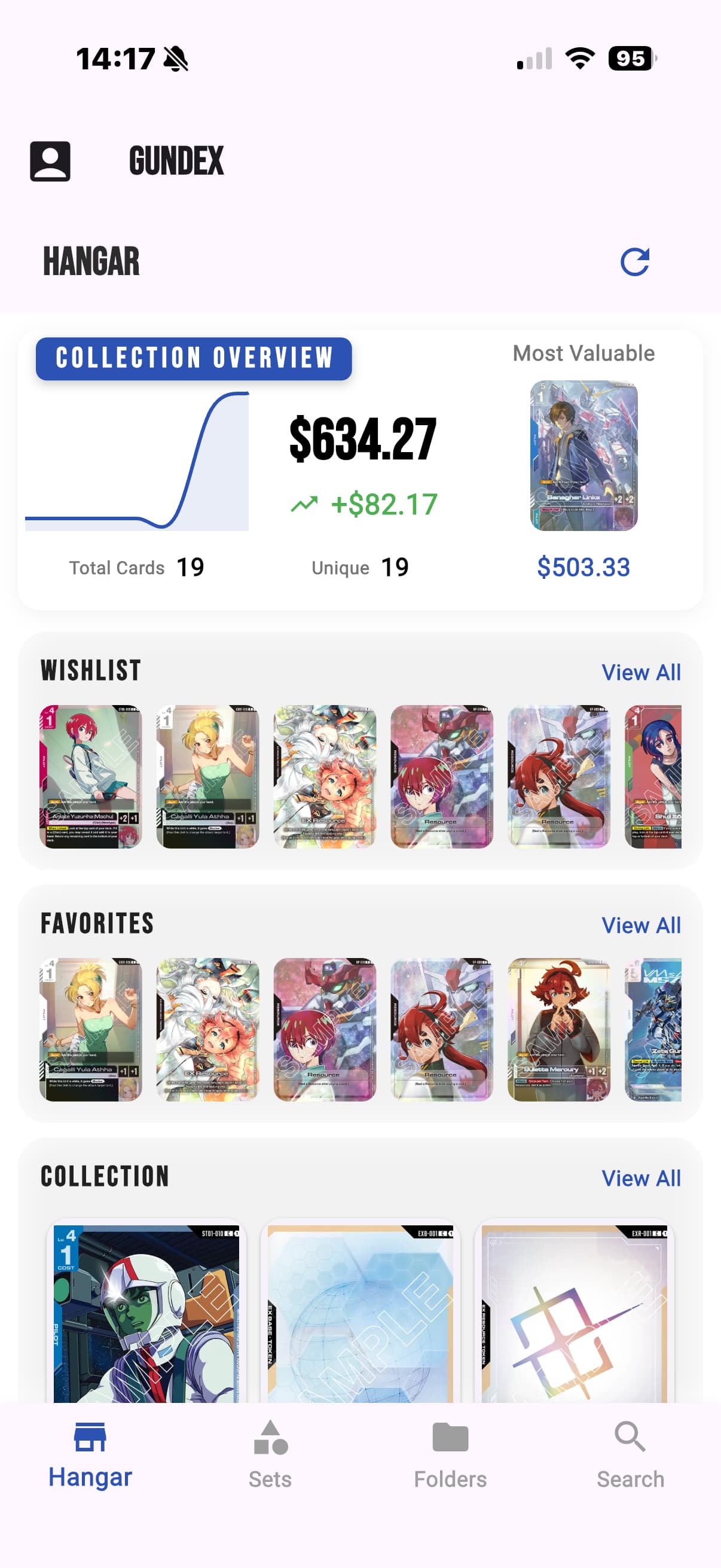
Track the exact card print and the number of copies you own. Your Hangar brings your collection together, ready to revisit on mobile or web.
- Open a card and choose “Add to Collection.”
- Review your collection from the Hangar.
- Keep different prints and their quantities accounted for.
BEFORE YOUR NEXT PICKUPCheck what you already own so you can focus on the cards you still want.
03 PLAN YOUR NEXT FIND
Never lose sight
of your next chase.
That card you spotted? Save it. Keep your wanted cards in a wishlist and your favorites easy to come back to.
- Save cards you want to your wishlist.
- Search and revisit your saved list.
- Keep favorites close at hand.
WHEN YOU’RE READY TO TRADEPull up your wishlist and remember exactly what you’re looking for.
MAKE THE COLLECTION YOURS
From a growing collection.
To your own way of collecting.
MOBILE / SCANNER · BETA · FULL BURST
From the card in your hand to Gundex.
Open the camera scanner in the iOS or Android app to look up a single card or scan a batch. Review each match, print, and quantity before confirming your bulk additions.
The scanner is in beta. Clear photos help, and you stay in control of which matches you keep.
IMPORT, EXPORT & MOBILE EXTRAS
Keep collecting your way.
Bring in collection data and supported deck lists. Full Burst includes collection export, plus mobile widgets for cards, sets, and collections.
On mobile, Full Burst also lets you download the catalog and images for read-only browsing without a connection. Collection changes and the web companion require a connection.
04 / FOLDERS & DECKS
A place for every plan.
Group cards into folders for trades, favorite artwork, or a deck you’re building. Organize the cards and quantities for each project without losing sight of your collection.
Build or import a deck, then review its statistics and legality. Use a trade binder to keep the cards you’re offering together.
05 / SHARING
Let someone take a look.
Share a direct link to an individual card so another collector sees the exact print you mean. You can also share a folder, trade binder, or deck; eligible shared lists can be copied into a recipient’s account.
Card links show public card details, not your private collection notes. You control access to shared folders and decks and can revoke their links.
06 / SET COMPLETION
Know your next missing piece.
See Base and Master completion for supported sets. Different prints count toward the right target; extra copies don’t inflate your progress.
Open a set, check what’s missing, and keep the cards you’re chasing on your wishlist.
07 / COLLECTION VALUE
Put your collection in context.
See available market prices and an estimated value for the cards you own. Look closer at individual prints to understand what contributes to the total.
Estimates depend on available pricing and aren’t a guaranteed sale price. Cards without prices remain visible.
ROOM TO GROW
Take it further with Full Burst.
Unlock the mobile scanner, expanded binder access, collection export, mobile widgets, and downloaded catalog browsing. Find current subscription details in Gundex.
A FEW THINGS TO KNOW
Good questions.
Simple answers.
What is Gundex?
Gundex is an independent Gundam Card Game companion app for browsing cards, tracking your collection, organizing folders and decks, and sharing with other collectors.
Is Gundex free?
Gundex is free to download, with optional subscriptions. Current subscription details are available in the app and your app store.
Can I use Gundex in my browser?
Yes. Open Gundex Web to browse on a bigger screen, or use the iPhone and Android apps when you’re out. Sign in with your Gundex account to access your saved collection.
How do I track my collection?
Open a card and choose “Add to Collection.” Your Hangar brings your collection overview and saved cards together.
Can I make a wishlist?
Yes. Save cards you want to your wishlist, then revisit and search your list when you’re planning your next pickup.
Is Gundex affiliated with Bandai Namco?
No. Gundex is an independent, fan-made app. It is not affiliated with, endorsed by, or sponsored by Bandai Namco.
MADE FOR THE LOVE OF COLLECTING
From one collector to another.
Gundex is an independent app from Gundex LLC, created by a collector for fellow Gundam Card Game collectors.
Get in touch ↗YOUR NEXT CHAPTER STARTS HERE
Give your collection
a home.
Browse, collect, and plan your next find with Gundex.
Free to start. Optional Full Burst subscription.